

Hire by Technology
SERVICES

Maintaining cybersecurity while working from home is difficult but essential. Do you have a development team that works remotely? It can be scary to think about all the confidential data that is left vulnerable through distributed teams.
Fortunately, security best practices are not secrets. You just have to know where to find the information. And Trio, with its highly experienced software engineers, works to provide you with the best insights into the technology market.
Our team's expertise allows us to stay on top of the latest trends and developments, ensuring that you receive valuable and up-to-date information to make informed decisions in the fast-paced world of technology.
Stay tuned to learn more about cybersecurity procedures for work-from-home teams.
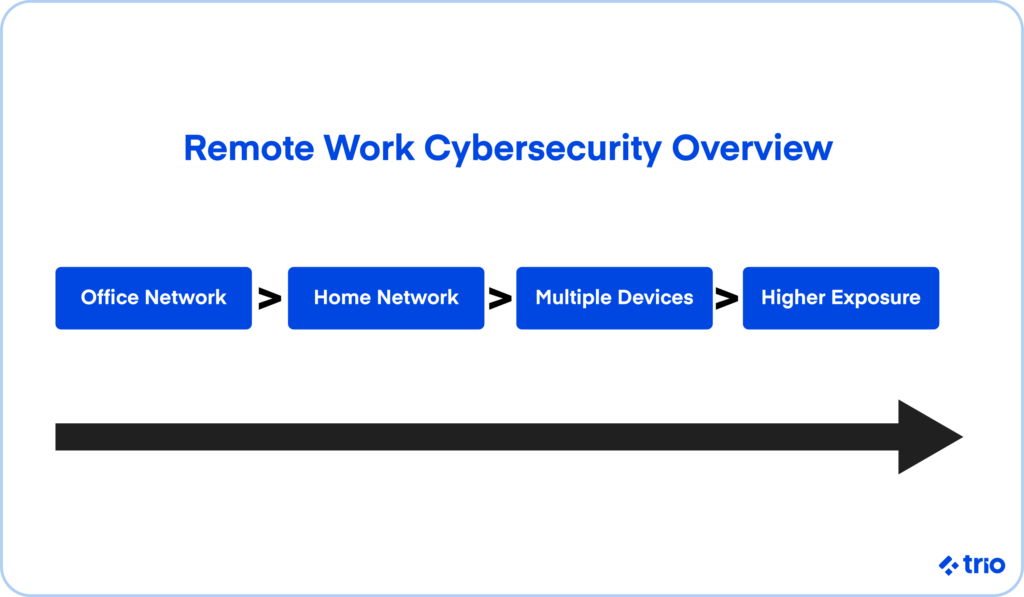
Work-from-home cybersecurity refers to the set of tools, habits, and policies that protect employees, devices, and company data when work happens outside a traditional office.
Although that sounds simple enough, the practical reality is a bit messy. Remote environments rely on personal routers, mixed-use laptops, home Wi-Fi, and a patchwork of applications that may not always be configured with security in mind.
When everyone worked in the same building, IT teams had full control over firewalls, networks, and devices.
Today, businesses depend on dozens of tiny home offices, each with its own level of risk. That shift creates vulnerabilities that are easy to overlook, especially for distributed engineering teams who access code repositories, staging environments, and production data from multiple locations.
Remote workers appear to face a noticeably higher attack rate than on-site employees. Attackers know that home networks are usually less secure and that people may reuse passwords or delay updates when they're busy.
We've noticed several trends worth paying attention to:
These patterns may not seem dramatic at first, yet they compound quickly across a large remote workforce.
If your company is working with sensitive data, has a large user database, or is involved in financial operations, you should pay extra attention to ensure your security measures are properly in place.
Keeping information safe while everyone is working in the same office is easier than working with distributed remote employee networks. With work-from-home jobs, cybersecurity threats stem from unprotected home and public network access.
Endpoint security is another factor influencing data breaches. This includes updating operating systems and software, using anti-virus programs, and installing network firewalls.
According to the 2022 State of Endpoint Security Report, it takes 102 days on average to patch critical software and operating systems, leaving sensitive data vulnerable.
But more than anything, cyber threats take advantage of a lack of awareness. Numerous companies don't educate their employees about cybersecurity in work-from-home environments. An uninformed approach or no approach at all is often the result.
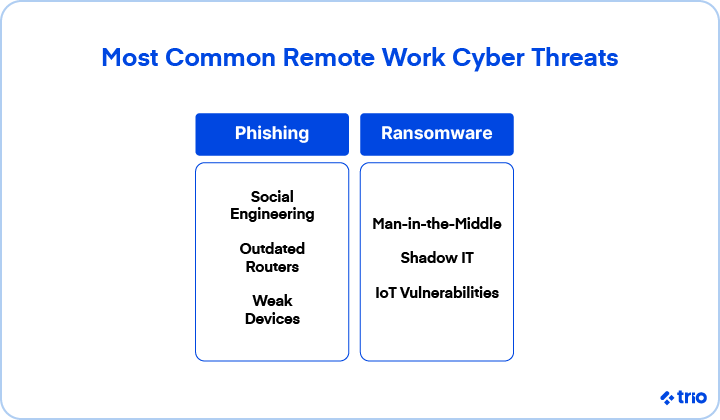
While the risks above still matter, remote workers face several additional threats that have become far more common in recent years.
Attackers send emails or messages that look like GitHub alerts, payroll updates, or vendor invoices. Even seasoned developers sometimes hesitate before deciding whether a message is legitimate.
A single compromised machine can encrypt or expose shared files and cloud resources. Ransomware groups increasingly look for remote endpoints because home networks are easier to breach.
This includes fake tech support calls, fraudulent SMS messages, and even impersonation attempts on collaboration tools like Slack or Teams.
Public Wi-Fi or poorly secured home routers may let attackers intercept traffic. This is fairly rare for individuals, but it can still occur when someone joins an open network at a café or airport.
Many household routers use factory passwords or outdated firmware. Attackers scan entire internet blocks looking for these devices because they're easy entry points into a home network.
Developers sometimes install browser extensions or productivity tools without realizing they have access to sensitive data. This creates unexpected risks for companies trying to maintain consistent controls.
Older laptops, missing updates, or disabled firewalls may turn into simple gateways for attackers.
Home printers, cameras, or smart home devices occasionally sit on the same Wi-Fi network as work machines. These devices rarely get updated and may expose ports or services without users realizing it.
Understanding these risks lays the groundwork for the practical steps your team can take next.
Forewarned is forearmed. Once you know that there are threats out there that can compromise cybersecurity when you work from home, you can make sure that risks are minimized.
You can't totally eliminate the possibility of a cyberattack, but you can do your best to reduce the likelihood of it happening.
Start with the obvious: Educate both onsite and offsite employees about cybersecurity best practices and procedures.
This might entail regular security meetings where you inform your employees about new cybersecurity technologies and developments. Having this knowledge will significantly lower the impact of a cybersecurity attack.
While privacy and trust are important things to consider here, monitoring company-issued devices can help prevent cybersecurity issues at work from home stations. Remember these tips when working with digital internet-ready devices:
Some companies may also rely on MDM or EDR tools, which let IT teams push updates or lock a device if something appears suspicious. These tools sound intrusive at first, but in practice, they save teams from losing hours of work or exposing production systems.
Having a centralized strategy for dealing with security issues will ensure that everyone is following protocol and not exposing sensitive information to cyber risks.
A policy of this sort may include:
There should also be clear documentation for how to handle cybersecurity threats when they arise in work-from-home environments, so workers can follow along whenever they are in need.
If possible, keep these policies simple enough that people actually read them.
A long PDF almost guarantees that most employees skim it once and never return. A short checklist or a one-page guide tends to work better and stays fresh in people's minds.
Opting to use cloud service providers is one way to maintain a high level of cybersecurity in remote work. Cloud services use data encryption technology to transfer confidential information.
Now that blockchain is also being used in cloud software, transactions will be even more secure, and your budget will be happy as well.
It's also helpful to standardize which cloud tools your team should use.
When everyone chooses a different storage or messaging platform, your security team ends up chasing down a dozen different risk profiles. A clear, approved list of tools keeps everyone aligned.
A virtual private network (VPN) is one of the best ways to sustain work-from-home cybersecurity.
No matter where they are located, a VPN helps to increase the security of a web session, transferred data, financial transactions, and personal information.
With a VPN, your employees can create a private connection to your business network from a public internet connection. This way, they'll be enabled with online privacy and anonymity.
Still, a VPN is not magic. A misconfigured VPN can slow down development tools or create frustration for your team, which might lead them to turn it off. If that sounds familiar, it's worth reviewing your VPN settings or choosing a tool that fits your team's workflow more comfortably.
Adversarial attacks come in the form of intentionally malicious security breaches.
Some examples include:
Proper password management is one way to extend cybersecurity in work-from-home environments. Often this requires the likes of a password-generating software so your employees can avoid creating passwords that are easy to guess. This software is called a password manager.
On top of that, remote teams may want a simple process for reporting suspicious activity. If someone thinks they clicked the wrong link, they shouldn't feel embarrassed or worried. A quick message to your security lead may prevent a much larger issue later.
Login credentials are sometimes not good enough to prevent cyber attacks. Multi-factor authentication asks users to provide more than one form of authentication to prove who they are.
There are a few different ways to do this. Some apps use security questions in addition to login credentials. These tend to ask questions related to the user's childhood or other personal details.
Other apps use text or email authentication. They send you a code to your phone or email address, and you enter this code in addition to your login information.
Note that SMS codes are usually not the best factor for authentication. Even a stranger looking over your shoulder can put your information at risk.
Time-based one-time passwords (TOTP) can be useful for mitigating such risks. These passwords only work once, and they are active for only a short period of time.
Another method is biological authentication. This is when the app uses physical data, such as fingerprint or facial recognition.
Using multi-factor authentication decreases the likelihood that an attacker can access your business network.
Some teams also rely on hardware keys because they remove guesswork entirely. These tiny devices plug into a USB port and make the sign-in process harder to bypass, even if someone's password has already leaked.
They aren't a requirement for every company, but they are becoming more common for engineering teams that manage sensitive environments.
Trust is everything. But for that very same reason, you should limit how much access employees have to sensitive business information. By giving more people access, you open more avenues for security breaches.
Only give employees access to the apps and data they absolutely need. You can always give someone more privileges if and when the need arises. This is a much safer model than giving everyone open access.
If you ever feel unsure about who has what access, it may help to schedule occasional audits. These don't need to be exhaustive. Even a quick monthly review often reveals old accounts, unused permissions, or test tools that were never fully decommissioned. Small cleanups add a surprising amount of safety.
Firewalls are a basic line of defense on a computer system. But something as simple as turning off firewalls while working can leave you and your employees vulnerable.
Make it a required policy that all developers have firewalls on at all times for their work devices. Really, this might be the simplest way to guarantee some level of work-from-home cybersecurity, even at the smallest degree.
In some cases, a firewall alert may seem inconvenient. It might warn you when an app tries to communicate unexpectedly or block a download that looks harmless.
Still, these alerts serve a purpose. They give you a moment to pause and think before granting access to something that might expose your device.
There are a couple of ways to go about encrypting your information. The first is through employee devices. By requesting that your employees encrypt their devices when an employee's device is lost or stolen, no one will be able to access their data.
Secondly, you should encrypt the backups of any software and hardware you have that is connected to your business. Whether your business is managing an app, website, or hard drive, these things do fail or otherwise get infected by malware.
Your work-from-home cybersecurity plan should include a data backup plan. But even your backups are not always safe. Encrypt backups as well to avoid a data breach.
In practice, encryption feels invisible once it's configured. Most modern laptops can encrypt their drives automatically, and cloud providers encrypt stored data without you needing to manage keys.
The key challenge tends to be consistency. A single unencrypted drive or unmanaged backup can undo a lot of careful planning.

When you're working with distributed teams, having security measures can help you prevent a data breach. But sometimes a breach happens anyway, and when it does, you'll need a response plan.
Here are a few of the scenarios where you should plan for breaches for work-from-home cybersecurity:
These scenarios can result in negative consequences for your business, and it's your responsibility to respond to them appropriately.
Sometimes this means being ready to disable user accounts, take a server offline, or shut down production entirely.
In essence, you'll want to do whatever is necessary to contain the breach and make certain further information isn't put in jeopardy.
These procedures should be documented in a clear company policy.
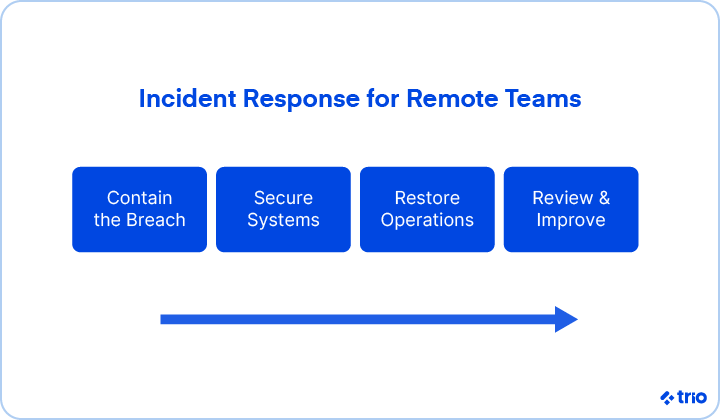
Preventive and containment measures should give you a leg up on any security issues you face with your remote development team.
Some of these measures include:
Hopefully, these guidelines will be advantageous in meeting that objective.
Trio is committed to helping you with your business needs.
While getting your software built is our main concern, we also care that your software is secure.
Contact us today to talk more about your project! We guarantee that we can fulfill your needs, from home cybersecurity to completing your next software development project.
Preventing home-based cyber attacks starts with securing your router, using MFA, and keeping devices updated. Those steps alone shut down many common entry points.
The biggest cybersecurity risks when working from home include phishing, weak Wi-Fi setups, outdated software, and unsecured personal devices. They tend to appear more often in home offices than in company spaces.
Using a VPN while working from home makes sense when you access internal systems or connect from public networks. If your tools are mostly cloud-based, the need may be lower, but still worth considering.
Improving WFH cybersecurity in the United States starts with router updates, MFA, and device encryption. Many ISP-provided routers ship with older firmware, so updating them helps more than people expect.
Working in cybersecurity from home is possible for many roles, especially those focused on analysis or engineering. Some positions still need controlled environments, but remote work is increasingly common.