


 Read Client Stories





 Alex Kugell
 Key Takeaways
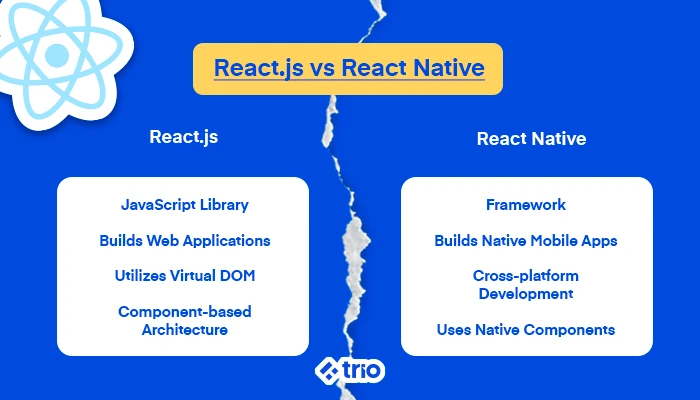
- React (also called ReactJS) is a JavaScript library for building web interfaces. React Native is a framework for building native mobile applications.
- React renders to the browser via the virtual DOM, while React Native compiles to native iOS and Android components through platform APIs.
- Shared concepts make switching between them more manageable than learning two entirely separate technologies. Components, props, state, hooks, and one-way data flow work the same way in both.
- For fintech, mobile-first financial products targeting emerging markets, where a significant share of users rely on Android devices as their primary computing platform, benefit from React Native over a responsive web approach.
- TypeScript, state management libraries (Redux, Zustand, React Query), and testing tools work across both.
React and React Native share a name, a creator, and a set of core concepts. They also confuse a remarkable number of developers and technical founders who are trying to make a real architectural decision.
In many contexts, confusing them tends to be harmless, but in fintech, it can lead to a misaligned hire, a mobile app built on the wrong framework, or a web dashboard that needed a different rendering strategy from the start.
In short, you could end up with extensive tech debt and underperforming products.
React is typically used to build web interfaces, while React Native is the best option for mobile apps.
Let’s look at what each technology actually does, how they compare technically, and which makes sense for specific fintech use cases.
At Trio, we place pre-vetted React and React Native engineers with fintech production experience in 3–5 days.
What Is React?
React is an open-source JavaScript library, not a framework. It handles building user interfaces, not prescribing routing, state management, data fetching, or server communication.
For all additional tasks, you will need to work with the wider ecosystem.
Meta released React in 2013, introducing a component-based model in which UIs get broken down into reusable, self-contained pieces that manage their own state.
A transaction history page becomes a composition of a TransactionList component, many TransactionRow components, a BalanceDisplay component, and a FilterBar component.
This allows each piece to update independently when data changes, without requiring a full page reload.
The virtual DOM is what makes this efficient.
When data changes, React creates a new virtual representation of the DOM, compares it to the previous one (a process called reconciliation), and updates only the elements that actually changed.
For a live balance display refreshing every few seconds, that means only the balance figure re-renders, not the entire page, improving user performance.
React also renders to HTML in the browser using JSX, which is a syntax extension that lets developers write HTML-like markup directly in JavaScript:
function BalanceCard({ amount, currency }) {
return (
<div className=”balance-card”>
<span>{currency}</span>
<span>{amount}</span>
</div>
);
}
Since HTML renders in a browser, not natively, React is ideal for web apps.
What Is React Native?
React Native, released by Meta in 2015, takes React’s component model and applies it to native mobile development.
Where React renders HTML elements in a browser, React Native maps components to native UI elements on the target platform, such as UIView on iOS and android.view.View on Android.
Practically, this means that a React Native application looks and behaves like a genuinely native app. It uses the platform’s own UI primitives rather than a webview, which means scrolling feels like iOS scrolling on an iPhone and like Android scrolling on a Samsung device.
It’s important to note that React Native uses different building blocks than React:
import { View, Text, TouchableOpacity } from ‘react-native’;
function PaymentButton({ onPress, label }) {
return (
<TouchableOpacity onPress={onPress}>
<View>
<Text>{label}</Text>
</View>
</TouchableOpacity>
);
}
There is no <div>, no <button>, no <span>. Instead, View replaces div, Text replaces any text-containing HTML element, and TouchableOpacity handles tap interactions. These components compile to native platform UI, not HTML.
React Native also provides direct access to device hardware through native modules. You can use the camera, GPS, Bluetooth, NFC, Face ID, and fingerprint authentication, along with the device keychain for secure credential storage.
For fintech, this gives you access to things like NFC for tap-to-pay or biometric authentication for secure login.
React vs React Native: The Key Technical Differences
| Feature | React | React Native |
| Primary purpose | Web application UIs | Native iOS and Android apps |
| Core elements | HTML tags (<div>, <span>, <a>) | Native components (<View>, <Text>, <TouchableOpacity>) |
| Rendering | Virtual DOM in the browser | Platform native APIs (Java/Kotlin, Swift/Obj-C) |
| Styling | Standard CSS, CSS-in-JS (styled-components, Tailwind) | StyleSheet object (JS objects), Flexbox by default |
| Navigation | URL-based routing (React Router, Next.js) | Screen-based navigation (React Navigation, Expo Router) |
| Hardware access | Browser APIs only (limited camera, geolocation) | Direct native module access: GPS, Bluetooth, NFC, biometrics |
| Development tools | Webpack, Vite, browser DevTools | Expo, Xcode (iOS), Android Studio |
| Performance ceiling | Excellent for web workloads | Near-native; not quite equal to pure native for graphics-intensive work |
Similarities of React and React Native
The shared foundation creates several similarities that developers often find useful when switching between the two.
Component architecture is the primary overlap, since both build UIs from encapsulated, reusable components.
A CurrencyInput component built for a React web form follows the same structural principles as a CurrencyInput component built for a React Native mobile form. The underlying mechanics, like props, state, hooks, and lifecycle, tend to behave identically.
Both also rely on JavaScript and TypeScript. Business logic, utility functions, API calls, and data transformation code can often be shared directly between React and React Native projects.
The benefit is that a currency formatting function, a KYC status state machine, or an API client for your payment provider can live in a shared package and be imported into both, making it easy to have a web dashboard and a mobile app offering the same services.
Hooks and state management, such as useState, useEffect, useCallback, useContext, and custom hooks, work the same way in both, too.
Redux, Zustand, and React Query all support both platforms, so a developer who understands React’s state model does not need to relearn it for React Native.
Finally, both are ideal for applications that require fast refreshes, since both support hot reloading during development, speeding up the development cycle considerably.
React in Fintech: Where It Fits
Our developers see React often in fintech web products, wherever a dynamic, component-driven UI adds value over a simpler page.
- Web-based dashboards and portals: Account management dashboards, transaction history views, portfolio overviews, and compliance reporting interfaces all suit React well. The virtual DOM handles frequent data updates efficiently.
- KYC and onboarding flows: Multi-step onboarding flows with conditional logic (show this step only if the user selected a business account, etc.) map naturally to React’s component model. Each step becomes a component, so the flow becomes a composable state.
- Marketing and product pages with SEO requirements: Client-side rendered React pages deliver an empty HTML shell to crawlers. Next.js adds server-side rendering and static generation on top of React, handling this correctly, and has become the standard choice for public-facing fintech pages.
Some of the most popular examples of React include Facebook (which still uses React heavily in its web products), Netflix, and many neobank and lending platform web interfaces.
React Native in Fintech: Where It Fits
React Native suits fintech products where the mobile experience needs to feel genuinely native, hardware access matters, or the user base is primarily mobile-first.
- Consumer payment and banking apps: A neobank’s mobile app handles biometric authentication (Face ID, fingerprint), push notifications for transaction alerts, and potentially NFC for tap-to-pay. All of these require access to native device APIs.
- Mobile-first markets: In South Africa, Brazil, Nigeria, and Southeast Asia, mobile devices represent the primary or only computing platform for a large share of the population. A fintech product targeting these markets needs a mobile app.
- Emerging-market performance constraints: React Native compiles to native components, which perform better on mid-range Android hardware than a web app running in a Chrome WebView. For financial products targeting users on older or entry-level devices with constrained CPU and RAM, native rendering matters.
Companies using React Native in their mobile applications include Bloomberg (which built its consumer app with React Native), Shopify, and Microsoft for several of its mobile apps.
Performance Comparison
React performs extremely well for web applications. Virtual DOM reconciliation keeps updates efficient, and tools like Next.js add server-side rendering, static generation, and streaming that improve perceived load time further.
React Native produces apps that feel native because they render native components.
That said, even though it has been constantly improving and does better now than ever before, it does not quite match fully native development for graphics-intensive work.
If you need complex animations, real-time camera processing, or 3D graphics, Swift or Kotlin will be the better option.
For most fintech use cases like transaction lists, forms, dashboards, card controls, and account views, React Native should be more than enough. The only time our developers have encountered issues is when processing real-time video for liveness detection in KYC flows.
Which Should a Fintech Team Choose?
The decision usually isn’t one or the other, but which one you should invest in first.
Start with React if your product’s primary interface lives in a browser, the users are desktop-first, or the immediate need is a web dashboard for B2B customers, compliance officers, or internal operations teams.
Start with React Native if your product targets consumers on mobile, needs hardware integration (biometrics, NFC, push notifications), or serves a mobile-first market where App Store and Play Store distribution determines discovery.
Most fintech products that gain traction end up needing a web interface and a mobile app.
In these instances, the massive overlap between React and React Native can be incredibly beneficial, allowing you to minimize overall development time and create a cohesive user experience.
Regardless of what you need, having developers with experience in production fintech environments is essential to help you navigate the heavily regulated environment.
At Trio, we pre-vet senior React and React Native developers with exactly this kind of experience. Since these developers have already been assessed, they just need to be placed based on your requirements and can be onboarded in as little as 3-5 days.