

 Read Client Stories





 Alex Kugell
 Key Takeaways
- Cloud development is the practice of building, testing, and deploying software using cloud infrastructure rather than local machines or on-premises servers.
- It covers building applications that run on the cloud and doing the development work itself in the cloud using cloud development environments.
- Lifting an existing app onto a virtual machine is cloud hosting. Rebuilding it as containerized microservices with CI/CD is cloud-native.
- The main deployment models are public, private, hybrid, and multi-cloud.
- The cost model shifts from capital expenditure to pay-per-use, which is more flexible and easier to overspend on. Egress and idle environments are the usual surprises.
At this point, it isn’t exactly news that cloud software development has changed how people and businesses interact with technology. What once demanded complex setups or in-house servers has become accessible from anywhere with a browser.
Organizations can build, deploy, and use applications without worrying about installation or infrastructure headaches.
From Zoom calls to Google Docs, and the vast ecosystem running on Amazon Web Services (which still holds roughly 29% of the cloud market), cloud software development is no longer the future. It’s the foundation of how modern software gets built and used.
Let’s explore how it works, why it matters, and what’s next for teams adopting it.
If you need cloud developers, you are in the right place. We have been connecting developers with companies since 2019, through hiring models like staff augmentation or outsourcing.
Our fintech developers excel in regulated industries like fintech, with production experience integrating cloud software into applications to serve thousands of users.
What Is Cloud Development?
Cloud development is the practice of building, testing, and deploying software applications using cloud-based infrastructure and services rather than local machines or privately managed servers.
It’s a rather broad term that spans the full delivery lifecycle: writing code, running automated tests, and deploying applications on infrastructure provisioned by a cloud provider.
Some people have the misconception that it is a single tool or product, but in reality, it is a set of practices and infrastructure patterns that together move software delivery off local machines and onto cloud platforms.
Cloud software development is the process of designing, building, and maintaining applications that run on cloud infrastructure rather than on a local computer or private server.
Instead of buying and maintaining physical hardware, developers rent the computing resources they need through providers like AWS, Azure, or Google Cloud.
For everyday users, this may sound abstract, but if you’ve ever stored files in Google Drive, streamed a show, or updated a spreadsheet online, you’ve already interacted with cloud software.
Two Meanings of “Cloud Development”
The term gets used for two different things, and conflating them causes most of the confusion around it.
Building software that runs on the cloud: The application itself is hosted on cloud infrastructure (AWS, Azure, Google Cloud) rather than on servers you own. This is what most people mean by cloud software development.
Doing the development work in the cloud: Your code editor, build tools, and test environment all run remotely, and you connect through a browser or a local IDE. This is a cloud development environment, and it’s covered in full below.
Most teams now do both, but they’re independent choices. You can build a cloud-hosted application entirely from a laptop, and you can use a cloud development environment to write software that ships to an on-premises server.
What Is Cloud-Based Software?
The term cloud-based software simply refers to software that runs on the cloud.
Users connect through the internet rather than installing anything locally. That flexibility is the whole point, since you want to scale up or down based on use, handle updates automatically, and save teams the trouble of owning and maintaining hardware.
Cloud Development vs. Traditional Development
Traditional development relies on each engineer configuring their own machine. That works for small projects and breaks down as teams and codebases grow.
However, cloud development moves infrastructure into shared, reproducible environments managed centrally.
Dimension | Traditional development | Cloud development |
Environment setup | Manual, per machine | Declarative, reproducible |
Consistency | Varies between engineers | Standardized across the team |
Onboarding time | Hours to days | Minutes |
Hardware dependency | Local workstation | Remote compute |
Scalability | Limited by local resources | Scales with cloud capacity |
Collaboration | File sharing, local branches | Shared environments, GitOps |
Cost model | Upfront hardware spend | Pay-per-use compute |
From what we have observed, it looks like the difference shows up most sharply during onboarding.
A new engineer joining a team with a cloud development setup gets a working environment in minutes. On a traditional setup, they can spend their first few days resolving dependency conflicts that affect only their machine.
Cloud Development vs. Web Development
The simplest way to keep these terms straight is to remember that all cloud applications are web applications, but not all web applications are cloud applications.
A web application is delivered through a browser. A cloud application is a web application that also relies on distributed, elastically scaled infrastructure rather than a fixed server.
Traditional web development typically builds locally and then deploys to a production environment, while cloud development treats the infrastructure as part of the application and manages it with the same tooling and version control as the code.
What Is a Cloud Development Environment (CDE)?
A cloud development environment is a remote, pre-configured workspace that runs in the cloud instead of on a developer’s laptop.
Engineers connect through a browser or a local IDE such as VS Code or a JetBrains product, while all compute, storage, and tooling run remotely.
The main reason CDEs exist is to solve the consistency problem. Since the environment is defined as code, usually with Dev Containers or Dockerfile-based templates, every engineer gets identical tooling, package versions, and service access.
This consistency is particularly important in environments like fintech, where you may also need to provide proof of the steps you take for consistency in terms of things like security.
What characterises a CDE:
Reproducible: Defined declaratively, so it provisions identically every time.
Ephemeral: Environments can be created per branch or per pull request and destroyed afterwards.
Centralized: Managed by a platform team rather than by each developer.
Resource-efficient: Compute is released when the environment isn’t in use.
The main platforms on the market right now are GitHub Codespaces, Ona (formerly Gitpod), and Coder, the last of which is self-hostable if you need the environment inside your own infrastructure.
JetBrains Gateway and VS Code Remote SSH cover the case where developers want to keep their local editor but run everything else remotely.
However, while there are many benefits to using CDEs, you need to understand that you still need somewhere to deploy the resulting application, and latency between the developer and the data center is a real constraint.
How Cloud Software Works
Cloud software depends on a web of remote servers that share computing power, storage, and networking resources. When someone opens a cloud app, they’re connecting to this network rather than a single device.
Most cloud applications have three main layers:
Front-end: the interface users interact with (browser or app)
Back-end: the logic, databases, and APIs that power the app
Cloud infrastructure: the servers, networks, and tools that make everything work together
Popular cloud development platforms like AWS Elastic Beanstalk, Microsoft Azure App Service, or Google App Engine let teams deploy code without needing to manage every component themselves.
These platforms also integrate with cloud development tools for testing, version control, monitoring, and CI/CD pipelines.
In practice, a small fintech startup might run its database on Amazon RDS, host its web app on Azure, and use Google’s AI APIs for language processing.
Core Components of a Cloud Development Workflow
A cloud development workflow spans several layers. Understanding how they fit together is what lets you decide sensibly what to build and what to buy.
Source control and CI/CD: Every change starts in a Git repository. Pipelines run tests, build container images, and trigger deployments on each push or pull request. GitHub Actions and GitLab CI sit here.
Containerization and orchestration: Applications are packaged as container images with Docker. Kubernetes schedules those containers across infrastructure and handles networking, health checks, and scaling.
Cloud infrastructure: Compute, storage, and networking are provisioned on AWS, GCP, or Azure, or on a managed platform that abstracts the provider entirely.
Managed databases and services: Rather than operating database servers by hand, teams use managed services from the provider or a platform.
Preview environments: Each pull request gets a dedicated, fully running instance of the application so changes can be reviewed in context before reaching staging.
Observability: Centralized logs, metrics, and tracing. This is one of the clearest practical advantages of a cloud-first workflow, because it’s genuinely hard to replicate locally.
Types of Cloud Technology
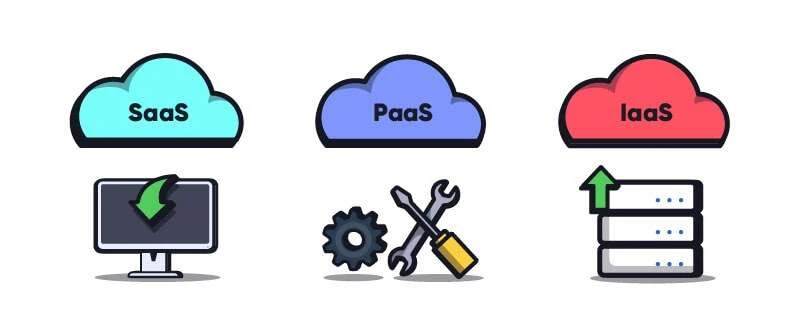
Typically, cloud services range between three categories:
software-as-a-service (SaaS)
platform-as-a-service (PaaS)
infrastructure-as-a-service (IaaS)
Types of Cloud Technology
Software as a Service (SaaS)
The most familiar model for end users. SaaS applications deliver ready-to-use software via the internet. Google Workspace, Salesforce, and Slack are classic examples.
Companies don’t install anything locally; they just need to subscribe and start using it.
SaaS represents the consumption side of the cloud. It’s convenient and affordable, though it trades off some control for ease of use.
Platform as a Service (PaaS)
PaaS provides the building blocks for developers to create their own applications without worrying about managing infrastructure. Azure App Service, AWS Elastic Beanstalk, and Google App Engine are all PaaS examples.
Developers write their code, deploy it to the platform, and the provider handles scaling, networking, and system updates.
In many ways, this is the engine behind cloud software development, a place where developers can focus on logic and user experience instead of servers.
Infrastructure as a Service (IaaS)
IaaS goes deeper by offering virtualized computing resources for servers, storage, and networks that developers can configure as they like. AWS EC2 and Azure Virtual Machines fall here.
It’s ideal for teams that want more control over configuration and performance without having to buy or maintain the actual hardware.
Cloud-Native Development
Over the past few years, cloud-native development has emerged as a category of its own.
It involves designing software specifically to take advantage of the cloud from day one using microservices, containerization (like Docker and Kubernetes), and continuous integration pipelines.
They are built around four principles:
Containers. Each service runs in isolation, typically orchestrated by Kubernetes.
Microservices. The application is decomposed into small, independently deployable services rather than one monolith.
Declarative APIs. Infrastructure and configuration are defined as code and applied through APIs, not manual processes.
CI/CD. Every change moves through an automated pipeline from commit to deployment.
While cloud-native systems are more complex to build, they scale and adapt more easily than older, monolithic architectures. It’s the direction most companies are moving, even if they’re not fully there yet.
Cloud Deployment Models
Where your workloads actually run is a decision with cost, compliance, and architectural consequences. There are five models in common use.
Public cloud
Private cloud
Hybrid cloud
Multi-cloud
Community cloud
Public Cloud
A public cloud is open to anyone.
Resources are shared between multiple clients, though data remains logically separate.
It’s cost-effective and simple to use, but it offers less customization. AWS, Azure, and Google Cloud are the biggest examples.
Private Cloud
A private cloud serves one organization only. It offers more security and control, which makes it popular among financial institutions, healthcare providers, and government agencies.
However, it can be costly to maintain and scale.
Hybrid Cloud
A hybrid model mixes private and public environments, allowing data and applications to move between them.
It’s often used by companies transitioning to the cloud or balancing sensitive workloads with scalable infrastructure.
Multi-Cloud
Multi-cloud means distributing workloads across more than one provider, some services on AWS, others on GCP or Azure. Teams adopt it to avoid vendor lock-in, to optimize cost per region, or because an acquisition left them with two stacks.
They also do this to minimize the risk of downtime when they are, for example, running payments and cannot afford the breach of trust that downtime would cause.
The biggest barrier here is that this model can get quite expensive.
Running across providers means duplicated expertise, more complex networking, and cross-provider data transfer costs.
Community Cloud
This model sits somewhere between public and private. It’s shared among organizations with similar goals or compliance needs.
Think of several hospitals pooling their data management software under common healthcare regulations, or RegTech firms sharing information on bad actors and potentially stolen cards.
It’s the least common of the five in practice, and largely confined to sectors with shared regulatory frameworks.
Choosing the Right Cloud Model
Selecting the right model depends on your goals.
Startups may prefer the flexibility and affordability of public clouds. Established enterprises may lean toward private or hybrid setups for better data control.
Teams offering cloud software development services often advise clients to combine models, using private resources for security and public ones for performance bursts.
How Teams Structure Cloud Development
Most engineering teams running cloud workflows use a three-environment model: development, staging, and production. Each mirrors production infrastructure as closely as practical, which narrows the gap between where code is tested and where it runs.
A typical GitOps workflow:
Engineers work on feature branches, each with its own preview environment on live infrastructure.
Pull requests trigger CI pipelines, which run automated tests against that preview environment.
On merge to the main branch, staging updates.
After validation, a release pipeline promotes the build to production.
Preview environments are where we see this create the most immediate value.
Reviewing a UI change or an API integration on a running environment rather than a screenshot shortens review cycles and surfaces integration problems before they reach staging.
Again, this is critical in fintech where you cannot afford any live bugs that might alter user perception.
The discipline that our senior developers have emphasized the most here is teardown. You should preview environments left running after a pull request closes are one of the most reliable sources of unexplained cloud spend.
Benefits of Cloud Software Development
The advantages of cloud computing follow a trend of convenience that should not be taken for granted. Take a look at what cloud technology can do for your business.
1. Lower Costs and Flexible Pricing
Cloud platforms operate on pay-as-you-go models. Instead of heavy upfront investments in hardware, companies pay only for what they use.
There are no electricity bills for 24/7 servers, no maintenance crews, and fewer surprises in the budget.
A small business might start with a single virtual machine and scale up gradually, while an enterprise can spin up thousands of instances during peak demand.
This elasticity makes cloud software development especially appealing for startups that need room to grow without heavy infrastructure costs.
2. Faster Deployment and Easier Maintenance
Launching new software used to mean ordering servers, setting up environments, and scheduling deployment windows. Cloud platforms reduce this process to minutes.
With automated updates and managed services, teams spend less time on maintenance and more on building features users actually care about.
Think of it as renting a fully stocked workshop instead of building one from scratch. You can walk in, start working, and leave the upkeep to someone else.
3. Scalability and Performance
Scalability is one of the cloud’s greatest strengths. When demand spikes, resources scale automatically. When traffic drops, costs fall back down.
This adaptability allows companies to focus on growth without worrying about whether their systems can handle it. It’s also a major reason why cloud-based software development has overtaken traditional hosting models.
4. Global Accessibility
Cloud software is inherently remote-friendly. Whether your developers are in São Paulo or Singapore, everyone connects to the same infrastructure.
That global reach also benefits users.
Data centers distributed around the world mean faster response times and better reliability.
5. Speed to Market and Competitive Edge
With cloud environments ready to go, new products reach customers sooner. Teams can test, iterate, and deploy updates on short notice.
For industries racing to stay relevant, this kind of agility is critical.
What Cloud Development Actually Costs
“Lower costs” is the standard claim, but we have seen all too often that it’s only half true.
Cloud development shifts spending from capital expenditure to operational expenditure. The model is more flexible, but it introduces cost drivers that are easy to underestimate and easy to lose track of.
Compute: Running services, build pipelines, and databases continuously. Idle environments left running accumulate charges quietly.
Egress: Data transferred out of a cloud region is billed separately by most providers, often at rates far above storage. Architectures that shuttle large volumes between regions or services compound this fast, and it’s the single most common source of a surprise invoice.
Storage: Persistent volumes, container image registries, and database storage all carry per-GB pricing. Registries in particular accumulate old images indefinitely unless something prunes them.
Preview environments: Without a lifecycle policy, environments for closed pull requests keep consuming compute and storage.
From what we have observed, it’s incredibly clear that teams who plan and orchestrate their spend early (per-service cost allocation and automatic idle-resource policies) are in a much better position when they scale.
Retrofitting cost visibility onto a sprawling estate is considerably harder than building it in.
Challenges and Risks of Cloud Software Development
No technology is without its trade-offs, and while cloud development solves plenty of old problems, it introduces new ones that teams can’t ignore. Understanding these challenges early can save you from frustration down the road.
1. Security and Compliance
Handing your data to a third-party provider requires trust. While companies like AWS and Microsoft spend billions on security, no system is immune to breaches.
In August 2025, attackers used stolen OAuth tokens from the Salesloft Drift integration to export data from a wide range of companies’ Salesforce instances, then searched the stolen records for AWS keys and other credentials. Salesforce itself was never breached. The way in was a third-party app that customers had connected and granted broad access to.
These incidents don’t mean cloud services are unsafe, but they remind us that shared responsibility matters.
Businesses still need to manage user access, encryption policies, and compliance with laws like GDPR or HIPAA. It’s tempting to assume the provider handles everything, but that assumption often backfires.
The shared responsibility model is worth stating explicitly, because misunderstanding it causes most cloud security incidents. The provider secures the infrastructure through physical data centers, the hypervisor, and the managed service itself.
You secure everything you put on it: access controls, network configuration, encryption settings, application code, and data. A misconfigured storage bucket is your incident.
2. Downtime and Connectivity
Cloud systems depend on an internet connection. When the network goes down, productivity goes with it. Even the best providers occasionally suffer outages.
In October 2025, a latent race condition in DynamoDB‘s automated DNS management left a regional endpoint in AWS’s us-east-1 with empty DNS records. The failure cascaded for more than fifteen hours and took Slack, Snapchat, Atlassian, and a long list of other services down with it.
For companies running critical systems, this dependency can be nerve-racking. Backup strategies, redundancy, and multi-region deployments are your safety nets.
3. Vendor Lock-In
Once your application relies heavily on a specific cloud platform’s tools, switching providers can be a headache.
Each service has its own ecosystem of APIs, databases, and billing structures that may not transfer neatly to another.
That’s why many architects build hybrid systems or adopt open-source frameworks from the start. It’s about keeping your options open.
The practical hedge is to be deliberate about where you accept lock-in.
Managed databases and proprietary serverless runtimes bind you tightly; containers, Kubernetes, and Terraform are portable across providers.
Accepting lock-in on the pieces that genuinely save you operational effort, while keeping the core application portable, is a more workable position than trying to avoid it altogether.
4. Customization and Control
When someone else owns the infrastructure, you inevitably lose some control. Cloud software lets you move faster, but limits how deeply you can configure the environment.
For most teams, that’s a fair trade. But for highly specialized industries like high-frequency trading or medical imaging, it can feel restrictive.
Customization and compliance sometimes require the old-school approach of private servers or hybrid setups.
Cloud Development Tools, Platforms, and Best Practices
One reason cloud-based software development has become mainstream is the variety of tools available. Modern developers have access to an ecosystem that handles everything from hosting and automation to security and analytics.
Popular Cloud Development Platforms
Amazon Web Services (AWS): Offers scalable infrastructure, AI/ML tools, and DevOps automation.
Microsoft Azure: Strong in enterprise integration and hybrid cloud management.
Google Cloud Platform (GCP): Known for its AI capabilities and open-source alignment.
These platforms share a common goal to reduce friction so developers can focus on the software, not the setup.
Essential Cloud Development Tools
Teams often rely on a mix of:
Jenkins or GitHub Actions for CI/CD
Prometheus and Grafana for monitoring
GitHub Codespaces, Ona or Coder for cloud development environments
AWS CDK for defining infrastructure in general-purpose programming languages
These tools make scaling, testing, and maintaining cloud application software development much easier.
Best Practices
A few guiding habits go a long way:
Automate early: Manual deployment errors can be costly.
Monitor everything: Cloud resources may appear infinite, but your budget isn’t.
Design for failure: Assume something will break eventually, and plan recovery before it happens.
Keep security proactive: Build it into your pipeline, not as an afterthought.
Define infrastructure as code: If your environment can only be recreated by someone remembering what they clicked, you don’t have an environment; you have a liability.
Set a teardown policy: Ephemeral environments must actually be ephemeral.
Following these principles helps you avoid common pitfalls and keeps your system stable as it grows.
Hiring for Cloud Development
Cloud development sits across several disciplines that used to be separate jobs, and that’s what makes hiring for it awkward.
A strong application developer who has never provisioned infrastructure will build something that works and costs three times what it should. A strong infrastructure engineer without application experience will build a beautifully automated platform nobody wants to deploy to.
What to look for, depending on what you’re building:
Application-layer cloud developers: Comfortable with containers, managed services, and CI/CD, and able to reason about how architectural choices translate into a monthly bill.
Platform and DevOps engineers: Kubernetes, Terraform or Pulumi, observability tooling. These are the people who make the other engineers fast.
Cloud architects: Deployment model selection, multi-region design, cost modeling, and the compliance constraints that apply to your sector.
The question worth asking in an interview isn’t which services someone has used. It’s whether they can explain a trade-off they made and what it cost them, because cloud development is almost entirely a discipline of trade-offs between speed, control, portability, and spend.
On top of all of that, if you’re hiring in a regulated environment, add data residency and audit requirements to that list.
The Future of Cloud Software Development
AI and Automation
More cloud providers are integrating machine learning directly into their platforms.
AI can now optimize workloads, manage scaling automatically, and even predict outages before they happen. For developers, that means more time spent coding and less on operational maintenance.
Edge and Serverless Computing
Serverless architectures (like AWS Lambda or Azure Functions) have taken the idea of “only pay for what you use” even further. Instead of managing servers at all, you deploy individual functions that run only when triggered.
Meanwhile, edge computing brings processing closer to the user. This reduces latency and improves performance for IoT devices, mobile apps, and real-time analytics.
Together, these trends suggest a shift toward smaller, faster, and more distributed systems.
Security in a Decentralized Future
As businesses diversify across multiple platforms, zero-trust security models are becoming standard.
Instead of one firewall protecting everything, every user and device is verified continuously. It’s more complex but also more adaptive to the modern threat landscape.
Conclusion
Cloud development is simply how software gets built now, which means the interesting decisions have moved downstream: which deployment model fits your compliance position, how much lock-in you’re willing to accept in exchange for operational leverage, and whether your team can see what they’re spending before the invoice arrives.
The three service models, SaaS, PaaS, and IaaS, describe how much of the stack you hand over. The deployment models describe where it runs. Cloud-native describes how the application itself is built.
Those are separate decisions, and treating them as one is how teams end up with an architecture nobody chose.
Get them right, and you gain speed, elasticity, and reach. Get them wrong, and you’ve traded control for a service that isn’t even ideal for your situation.
Need developers to get your project up and running? Trio has just what you need.