

 Read Client Stories




 Alex Kugell
 Key Takeaways
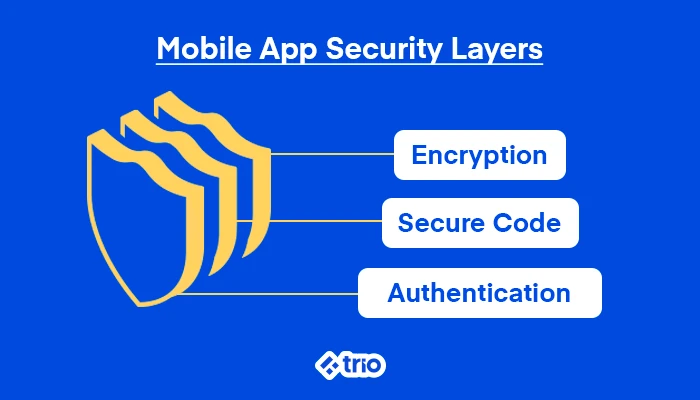
- Encryption needs to cover data both at rest and in transit. AES-256 for storage, TLS 1.3 for transmission.
- The OWASP Mobile Top 10 (2024) is the closest thing the industry has to a shared map of where mobile apps actually fail, so it’s worth knowing, even loosely.
- Authentication is where most real-world breaches start. Multi-factor authentication and proper session handling close off the easiest attack paths.
- Hardcoded credentials and unencrypted local storage remain two of the most common and preventable mistakes developers make.
- Security needs to run through the whole build process, then continue after release through monitoring and patching.
- For apps handling financial data specifically, the bar sits meaningfully higher, since the attack surface and the consequences of a breach are both larger.
Mobile apps handle more sensitive data today than most people stop to think about. Location history, payment details, identity documents, and even health records all sit on a device that gets lost, stolen, or connected to a coffee shop’s Wi-Fi network without a second thought.
As a mobile app creator, it is your responsibility to build security into a mobile app, especially if you are in industries like fintech. The apps that get it wrong tend to realize that they have made a mistake after a breach or even regulatory action.
This guide walks through what actually matters for mobile app security in 2026, so you can secure even the most impactful personal data, like financial information.
At Trio, our skilled developers have production experience in securing financial applications against real-world threats. To figure out what security best practices are required for your mobile application, and to hire the people who can implement those practices, book a security-ready consult.
Understanding Mobile Application Security
Mobile application security is the practice of protecting an app and the data it handles from unauthorized access, tampering, and theft.
That sounds straightforward in theory, but mobile apps face a genuinely different threat model than web applications do.
A web app runs on a server you control. A mobile app runs on a device that might be jailbroken, sitting on a public network, or physically in someone else’s hands within minutes of being lost.
In our experience, the starting point is almost always encryption.
Data at rest (sitting on the device) and data in transit (moving between the app and a server) both need to be unreadable to anyone who shouldn’t see it.
AES with 256-bit keys is the standard most teams reach for to protect passwords, payment details, and personal information, since intercepted or stolen data stays useless to an attacker without the key.
Depending on the type of application you are creating and the data that you are dealing with, this can matter a lot more in some cases than in others.
A fintech app handling balances, transaction histories, or account credentials carries a different risk profile than, say, a recipe app.
The financial data is worth a great deal to an attacker, and the regulatory consequences of getting it wrong are considerably higher.
Why Mobile App Security Actually Matters in Fintech
A single security breach can lead to a massive loss of user trust, which tends to be incredibly difficult to rebuild.
There’s also the regulatory exposure to consider. GDPR and CCPA both carry real penalties for mishandled personal data, and that’s before considering industry-specific rules like PCI DSS for anything touching payment cards.
And finally, there’s the financial cost, which can run well past the immediate cleanup once legal fees, customer churn, and remediation work are added up.
None of this is hypothetical. Mobile-specific breaches happen with enough regularity that “we didn’t think it would happen to us” has stopped being a credible excuse.
Building security in from the start is both cheaper and considerably less stressful.
The OWASP Mobile Top 10: A Shared Reference Point
OWASP, the Open Web Application Security Project, maintains a periodically updated list of the most common and consequential mobile security risks.
The current version is the 2024 release. This is worth treating as a baseline checklist.
The ten categories are:
- Improper Credential Usage: credentials handled, stored, or transmitted in ways that expose them
- Inadequate Supply Chain Security: vulnerabilities introduced through third-party libraries, SDKs, or build pipelines
- Insecure Authentication/Authorization: weak or bypassable login and permission checks
- Insufficient Input/Output Validation: unvalidated data that opens the door to injection-style attacks
- Insecure Communication: data transmitted without proper encryption, exposing it to interception
- Inadequate Privacy Controls: collecting or exposing more user data than the app’s stated purpose requires
- Insufficient Binary Protections: apps that can be reverse-engineered or tampered with too easily
- Security Misconfiguration: settings left at insecure defaults, on the server or in the app itself
- Insecure Data Storage: sensitive information stored on the device without encryption
- Insufficient Cryptography: weak algorithms or poorly implemented encryption that looks secure but isn’t
A few of these come up more often than the rest in real-world incidents.
Improper credential usage is probably the issue we see the most often. It generally comes up when authentication tokens or passwords are stored or transmitted carelessly.
Insecure data storage runs a close second, since unencrypted local storage is often the easiest thing on a device to extract once physical or malware access is achieved.
10 Practices to Secure a Mobile App
These practices map closely onto the OWASP categories above. You can use this as a working checklist to make sure that you have all of the basics covered.
- Use strong encryption everywhere: Data at rest and data in transit both need encryption. We recommend AES-256 for storage, TLS for anything moving across a network.
- Write code with security as a default: Input validation, output encoding, and avoiding common injection patterns (SQL injection, cross-site scripting) should be baked into how the team writes code from day one.
- Require multi-factor authentication: A password alone is rarely enough protection anymore. MFA closes off a large share of account takeover attempts, and for anything handling financial or health data, it’s expected.
- Protect API calls properly: Every API endpoint needs secure tokens and enforced authentication. An unprotected API is often the fastest way into an otherwise well-secured app, since attackers can bypass the app’s UI entirely.
- Implement TLS for all communication: This protects data as it travels between the app and the server, preventing interception even if someone is sitting on the same network as the user.
- Secure the backend, not just the app: Firewalls, intrusion detection, and regular patching on the server side matter just as much as anything happening on the device.
- Practice data minimization: Only collect and store what the app genuinely needs. Every extra field collected is an extra liability if a breach ever happens.
- Monitor for unusual behavior: Tracking access patterns and flagging anomalies, such as a login from a new country or an unusual volume of requests, helps catch intrusions early.
- Use app sandboxing: Isolating an app’s processes and data from the rest of the device limits how far malware can spread if it does get a foothold.
- Run regular security audits and penetration testing: Manual testing finds things automated scanners miss, particularly around business logic flaws and access control gaps.
Secure Coding Practices Worth Adopting
Security holes tend to start at the code level, which makes secure coding habits one of the highest-leverage places to invest.
As we have already mentioned, input validation should be the first line of defense. The app should only ever process data in the format it expects, and reject anything that doesn’t match.
We have seen firsthand how this single habit blocks a large share of common attack vectors before they go anywhere.
Output encoding matters just as much, particularly for preventing cross-site scripting, where a malicious script gets injected into the app to steal data or hijack a session.
Avoiding hardcoded credentials is one of those practices that sounds obvious but still shows up constantly in code audits. Passwords, API keys, and tokens should never live directly in source code, since anyone who gets access to the codebase (or decompiles the binary) gets access to those credentials too.
Code obfuscation tools add another layer, making it considerably harder for an attacker to reverse-engineer the app even if they manage to extract the binary.
Security Testing That Actually Catches Problems
Automated scans are great, but if that is all you rely on, then you increase the chances that you will miss things.
Static code analysis, dynamic testing, and vulnerability scans each catch a different slice of potential issues, and running all three together gives a more complete picture than relying on any one method alone.
Penetration testing deserves particular attention here, since it simulates how a real attacker would actually approach the app rather than checking against a known list of vulnerability patterns.
Our developers like to do this before launch and then periodically afterward.
A few specific tools come up often in this kind of testing.
Static analysis tools like MobSF can flag insecure data storage by scanning for unencrypted sensitive data sitting in plaintext.
Dynamic analysis tools like Wireshark help confirm that data moving between the app and the server is actually encrypted, catching gaps that would otherwise leave an opening for a man-in-the-middle attack.
Dependency-scanning tools like Snyk track third-party libraries for known vulnerabilities. These libraries are a genuinely common entry point, since most apps lean on dozens of external packages that the development team didn’t write and may not be actively monitoring.
Platform-Specific Considerations: Android and iOS
Android’s open-source nature makes it a frequent target, which puts extra weight on a few specific practices.
App permissions should be scoped to the minimum the app actually needs, since broad permission requests are both a security risk and increasingly something users notice and distrust.
Sensitive data should be stored using Android’s Keystore system, which provides hardware-backed encryption rather than relying on the app’s own storage logic. And apps should check for jailbroken or rooted devices, since those environments strip away several OS-level protections.
Tools like ProGuard help obfuscate Android code specifically, and device fingerprinting can add a layer of trust verification for returning users, making it harder for an attacker to spoof a legitimate session from an unfamiliar device.
iOS carries its own platform-specific guidelines, generally tied closely to Apple’s App Store review requirements, which include enforced HTTPS, defined data storage practices, and clear privacy disclosures.
The underlying principles are largely the same as Android’s. It’s just the implementation details and the platform’s enforcement mechanisms that differ.
Keeping an App Secure After Launch
Real-time monitoring for suspicious behavior should stay running continuously, not just during an initial post-launch window.
Reviewing access logs and auditing app performance regularly helps catch threats while they’re still small, rather than after they’ve had months to develop.
App store security guidelines also keep evolving, with Google Play and Apple’s App Store both updating their requirements periodically, and staying compliant means treating those updates as ongoing maintenance rather than a one-time setup task.
Teams that don’t have the internal bandwidth to maintain this kind of ongoing security posture often bring in outside expertise, either through a dedicated security hire or by working with a development partner who already has this built into their process, like Trio.
A Note for Fintech and Financial Apps Specifically
Everything above applies to any mobile app, but the bar moves up considerably once an app starts handling money, account balances, or financial identity data.
A fintech app operates under direct regulatory scrutiny, often including PCI DSS for anything touching payment card data, SOC 2 for service organization controls, and KYC/AML obligations depending on what the app actually does.
The OWASP Mobile Top 10 list above still applies in full, but a few categories carry particular weight in a financial context.
Insecure data storage and improper credential usage both translate directly into regulatory exposure when the data involved is a bank balance or a Social Security number rather than, say, a grocery list.
And insufficient cryptography, like using outdated or improperly implemented encryption, is one of the fastest ways for a financial app to fail an audit, even before any actual breach occurs.
On top of all of that, an app can follow every practice in this guide and still struggle to demonstrate compliance to an auditor without the documentation, access controls, and audit trails that regulated financial products are expected to maintain.
That layer tends to require developers who’ve actually worked inside regulated environments before, not just developers who are technically strong in general.
Related Reading: Fintech Hiring Slowdown
Final Thoughts
Mobile app security is a discipline that runs through every stage of development and continues well past release.
Strong encryption, careful authentication, secure coding habits, and consistent testing form the foundation. For apps in regulated spaces like fintech, that foundation needs to be paired with the compliance fluency to prove it holds up under scrutiny.
Getting both right at the same time usually comes down to having the right people on the build, which is often where partnering with developers who already understand regulated environments makes the difference between a secure app and an audit-ready one.