

 Read Client Stories




 Alex Kugell
 Key Takeaways
- UI builds the buttons, colors, and components, while UX shapes the flows, research, and testing behind them.
- UX tracks task success, time on task, and the System Usability Scale; while UI tracks contrast, consistency, and error-state clarity.
- A product designer often does both in a small team, while complex products benefit from dedicated UI and UX hires.
- Generative tools speed up research synthesis, wireframing, and first-draft UI, shifting designers toward direction and validation rather than production.
- US UI and UX designers earn roughly $109,000 to $116,000 a year on average, so LATAM- or Africa-based designers can deliver comparable work for less.
People often use the term UI when they mean UX, and vice versa. While your team might understand what you mean, failing to differentiate between the two can lead to mismatched expectations.
You may encounter inconsistent design work and even product failures.
If you are hiring, it is even more important. Hiring a UX designer when you mean to hire a UI designer can lead to delays and wasted resources. In industries like fintech, even the smallest shift in user experience that results from a faulty hire like this may result in a loss of trust.
So, what is the difference between UI and UX?
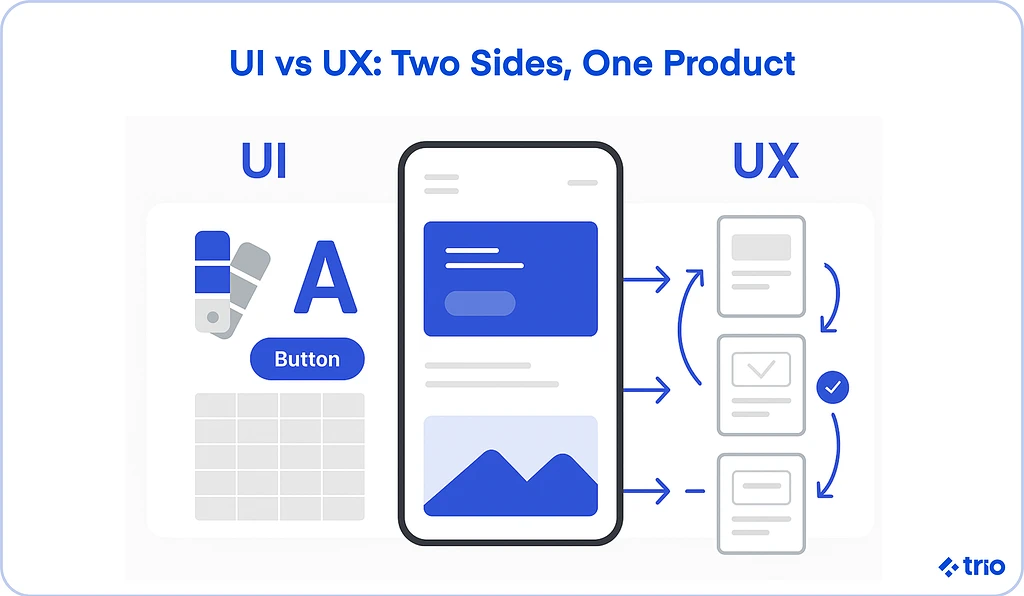
In short, UI focuses on user interface design. It is the process of creating the various aspects of your user-facing digital products, such as buttons, menus, and more.
User Experience design is more of an art than a science, and involves experimenting with the overall feel and ease of use. Instead of coding the button, you figure out where users will look for it.
A quick way to picture the difference is to think of a house. UX is the foundation, floor plan, and plumbing: it decides how the home works and how easy it is to live in. UI is the paint, fixtures, and decor: it decides how the home looks and feels once you step inside.
Before you consider hiring, let’s ensure you have a basic understanding of the difference between UI and UX.
If you are interested in hiring UI or UX developers, or you aren’t sure which you need, we are able to help.
At Trio, we have collaborated with a diverse range of companies, including financial software development companies.
Our developers, whether through outsourcing or IT staff augmentation, have been able to create systems for both UI and UX in fintech products, integrating into existing teams and helping companies separate the two and develop their final product or service efficiently.
Quick Comparison: UI vs UX at a Glance
The best way to understand the differences between UX and UI is to examine them side by side. Since PX and product design are often misused as well, let’s include these terms in our comparison.
Table Comparing UI, UX, PX, and Product Design
| Term | Goal | Outputs | Person Responsible |
| UI (User Interface) | Do the actual creation of the final product. | Visual design elements like color, typography, different components, and states. | UI designer, visual designer |
| UX (User Experience) | Make sure the product works intuitively. | Research responsive designs, experiment with flows, run tests, and create wireframes or prototypes. | UX designer, researcher |
| PX (Product Experience) | Optimizes the whole product lifecycle. | Onboarding and flow adoption, along with any analytics. | Product team, growth team |
| Product Design | Ensure that all aspects of UI and UX work well together. | Combines workflows and systems to ensure alignment with company strategy. | Product designer |
When to focus on UI vs UX vs PX
If things aren’t working well, whether it’s a technical issue or a color that isn’t displaying correctly, UI designers work to resolve the issue. We usually recommend that this is where you start.
Once you are satisfied with how things look, for example, ensuring that there are no broken buttons, you can focus on making it as easy as possible for customers to complete their tasks.
If you notice that customers are abandoning your product, it might also be a good idea to get a UX designer on board to make sure you have a positive user experience.
Finally, for long-term engagement and value, you can broaden out further to product experience.
What Is User Experience (UX) Design?
User experience design processes aim to shape how the end user interacts with a product. The goal is always efficiency and efficacy.
Definition in plain language
You want to make sure your customers have no problems when they use the product. In web and mobile apps, this involves everything from their first impression to how intuitively your platform works and the resulting engagement.
Suppose they want to check out but can’t figure out how; they are probably going to abandon their purchase. If they want to navigate to a specific page but can’t find it, they may not return.
Key UX designer tasks and responsibilities
The UX design process comprises several key tasks and responsibilities.
Generally, you will start with UX research. This could be using analytics from your existing product, or it could be from scratch. To conduct user research effectively, ensure you have a clear, well-defined niche persona to target. You can then create journey maps.
Other tasks include designing information architecture and flows, building wireframes and prototypes that take very few resources to produce, and then using those prototypes to run tests.
UX designers focus on iteration as well. Since the prototypes are low-cost, it is risk-free to create different versions. These can be used early in the testing process, but continuous iteration is always needed to ensure you stay up to date with shifting user expectations.
Common UX artifacts
Tangible outputs can support the work of your UX team.
When it comes to their research, starting with a plan to guide discovery and then a journey map to highlight pain points is useful not only to guide your developers but also to motivate the decisions made in their iterations to improve user-centered design.
Wireframes and prototypes are the next phase of outputs you can expect. Wireframes can be used for layout and navigation. They aren’t full products. These wireframes can then be used to create prototypes of your final product, which can then be used for further testing.
Usability test scripts and reports are very useful outputs too, whether these are created before iteration or after, to determine which version of the product is the best.
As mentioned above, user experience is more of an art than a science. There are no formulas that specify what users will prefer or find easier to use. But testing can provide clear evidence that can be used to make your final decision.
The difference between bad UX and good UX is grounding your final decisions in evidence rather than assumptions.
UX metrics you can track
Does your product have a good user experience? What metrics should you be looking for in your usability test scripts?
Task success rate is a good indicator to start with. Consider the percentage of your users who end up completing the task that they set out to do. If your task success rate is low, you can then dive into where your users are abandoning those tasks.
Time-on-task can be used alongside this metric. If your users take a very long time to achieve their goal, the process might not be intuitive. Alternatively, the process might just have too many steps.
If the former is the case, you may also notice that error rates are high. These can be slightly more difficult to measure, as users may simply want to explore, especially if they are new to your app, but it is possible in some cases to pick up on the frequency of mistakes or failed attempts.
System Usability Scale (SUS) is another tool your UX designers may use. This is a standardized survey that gives you a score out of 100. The score is often used to compare iterations.
What Is User Interface (UI) Design?
Your UI designer focuses on various parts of your visual design, but in a very different way from your UX people.
Definition and scope
Your UI designer focuses on creating the various components, ensuring they function as intended and that your website remains consistent. UI design focuses on aligning form and function, so it involves both graphic design and coding.
Key UI designer tasks and responsibilities
Typically, a UI design professional will start by creating layout and grid systems and making sure that your color palettes and typography are available across the product interface. They may also design custom icons and imagery and specify interaction states like hover, click, error, and more.
UI designers also need to be familiar with accessibility guidelines, so they can make decisions regarding contrast and sizing.
Alongside these aspects of digital design, they build and maintain your component libraries, ensuring that you can use them throughout the product development process.
UX and UI designers will often work together to refine your designs and create the best end product possible.
Common UI artifacts
Your designs need to be both scalable and consistent. To make sure that these are possible at the same time, UI teams work together to create artifacts like style guides, component libraries, and design tokens.
The guides will consider your desired branding and the message you want to convey, while the component libraries are made up of things like buttons, forms, modals, and anything else that may need to be used more than once, and tokens cover color, typography, and spacing.
On top of that, they often create redlines and specifications for developers not familiar with the UI side of things, and even work on mockups for final approval.
UI metrics you can track (contrast, error states, consistency)
UI can very easily be measured in a quantitative way.
When it comes to color contrast, there are standards like WCAG that are pretty comprehensive. You can also look at consistency scores to make sure you are applying component libraries and design tokens consistently.
Error visibility is a great metric to figure out whether states are clear or if you need to address potential issues with recoverability.
Although more quantitative, you can consider user perception of attractiveness vs. usability by making use of concepts like the aesthetic-usability effect.
The Key Differences Between UX and UI Design
There are several key differences between these two fields that separate them.
1. Goals and focus
The ultimate purpose of UX design is to solve problems in use and make it a more pleasant experience for your clients.
UI, on the other hand, aims to make your product visually appealing, accessible, and consistent.
2. Deliverables and artifacts
As mentioned, UX outputs will include things like research reports, flows, wireframes, and prototypes. UI designers create outputs like component libraries and style guides.
One set is used for making changes, the other for consistency.
3. Tools and methods
UX tools facilitate user testing and research. UserTesting and Dovetail are two very popular options if you have the means to use external tools.
Outside of that, you may need a variety of flowcharting tools and wireframing software.
For UI tools, consider design systems. Our developers like Figma, but if this doesn’t suit your needs, Sketch is also a good option. You’ll also need software for prototyping and accessibility checkers.
4. Metrics for success
We have already mentioned metrics for success, which are very different.
As a reminder, UX metrics include usability scores, task completion, and efficiency, while UI metrics consist of things like visual consistency, accessibility, and error state clarity.
5. Can one person be both a UI and UX designer?
Technically yes. In smaller teams, you usually have a product designer who acts as a UI/UX designer. But when your organization grows, it is often better to hire specialists for each role.
Hiring separate UI and UX designers means that you can ensure depth of expertise, which can make the difference if you have a complex product.
How UI and UX Work Together
UX design and UI design work together throughout the product lifecycle to ensure the overall success of your user-facing design. Teams often collaborate with product managers, researchers, and frontend engineers, too.
UX is ultimately the first step; you need to consider how users are going to navigate your app before you can create your different UI components. However, both UX and UI design and maintenance have to be ongoing.
Problems can arise when your UX deliverables don’t provide enough information, or when your UI starts to make it difficult to use your app.
UI vs UX in Fintech Products: Two Examples
The split between UI and UX matters even more when money is involved, because people are asked to trust a product before they get any value from it. Two fintech moments show how the roles differ.
Onboarding and identity verification (UX)
Opening an account usually means signing up, uploading an ID, and waiting for a decision. How many steps that takes, what order they come in, and what happens when a photo upload fails are all UX decisions.
Unfortunately, this is where many people give up and abandon your application.
Signicat’s 2022 Battle to Onboard survey of 7,600 European consumers found that 68% had abandoned a financial application in the past year, and 21% each cited the time it took and the amount of personal information required.
UX teams track this kind of friction with task success rate and time on task.
Payment confirmation and error states (UI)
When someone sends money, the screen has to make the amount, recipient, and fees unmistakable, use readable contrast and consistent components, and explain in plain language what went wrong if a payment fails.
All of those are UI decisions, and they are how an interface earns trust.
A verification screen that looks nothing like the rest of the app, or an error message that says nothing useful, can make a legitimate payment feel like a scam.
Some of these steps, like KYC identity checks, are required by regulation, so the design job is to make them as clear and quick as possible rather than to remove them.
A well-planned flow (UX) still fails if the screens feel untrustworthy (UI), and a polished interface (UI) cannot rescue an onboarding process that asks for too much too soon (UX).
How AI Is Changing UI and UX Design
AI has quickly become a part of our developers’ daily workflow, and changes what UI and UX designers spend their time on more than it changes what the roles are for.
On the UX side, generative tools speed up the slow parts of research by summarizing interviews, clustering feedback, and drafting personas and journey maps from raw notes.
Some teams now generate first-pass wireframes and flows from a prompt, then refine them by hand.
On the UI side, Figma’s AI features and standalone generative-UI tools produce first-draft layouts, components, and copy that a designer edits rather than builds from scratch.
In Figma’s State of the Designer 2026 survey of 906 designers, 89% said they are working faster with AI tools and 91% said those tools improve their designs.
However, while this is all great, there are some traps we are increasingly seeing our clients fall into when they use AI without considering the true downsides.
AI output still needs human judgment, because a model will happily produce a confident layout that fails on accessibility or brand consistency. And research shortcuts can smuggle in bias if no one checks the source data.
The net effect is a shift in the job rather than the end of it: designers move toward setting direction, curating AI output, and validating it against real users, while the production work compresses.
When you hire, weigh how a candidate uses these tools without handing over the judgment.
Product Experience (PX) and Service Design
We have mentioned product experience, so where does it fit in the lifecycle? Unlike UX and UI design processes, PX deals with design in terms of business outcomes.
PX looks at how users experience value in stages like onboarding, adoption, retention, and expansion. You will usually measure it using metrics like activation rate, churn, and net revenue retention.
If you want an even broader view of your UX in terms of your business processes, you start looking at service design, which ensures that processes like customer support, sales, and other interactions align with your digital products.
Careers in UI and UX
According to Glassdoor, the average salary for UX designers in the United States is about $109k per year. The average salary for UI designers is about $116k per year.
Both positions are fairly in-demand, which is probably why the salaries are so high.
If you want to cut costs, you can consider hiring nearshore or offshore developers.
These developers are still highly skilled and have worked on countless remote products with international companies. They know how to work with global teams and provide cost-effective work without a sacrifice in quality.
At Trio, we provide these developers to our clients, hiring from regions like LATAM and Africa to ensure we keep our costs as low as possible. Our developers are available for as long as you need them, so you do not have to commit to full-time hires.
If you are interested in connecting with someone who can help you create the user-facing portion of your fintech product, request a consult.