
Hire by Technology
SERVICES



Screening a React developer for fintech tests two things at once: current React judgment, and whether they treat a frontend touching money as a security surface.
Even if you need a React developer to build a user interface, you will want to know that they have at least some experience on production fintech apps. Otherwise, they may create compliance obligations.
Let’s take a look at what to ask a React developer when hiring for fintech, so you can rest easy knowing that you have hired the right person for your team and minimized your overall risk.
For assistance in hiring pre-vetted developers with guaranteed fintech production experience, request talent.
A React interview for fintech has to do two jobs.
The first is standard and current. You need to determine if this person is actually fluent in React as it exists today, or if their knowledge applies to outdated versions of React.
The second is the one the general interview-question SERP ignores entirely. Do they treat a component that renders money the way it deserves to be treated, as a security and compliance surface rather than just a UI to build?
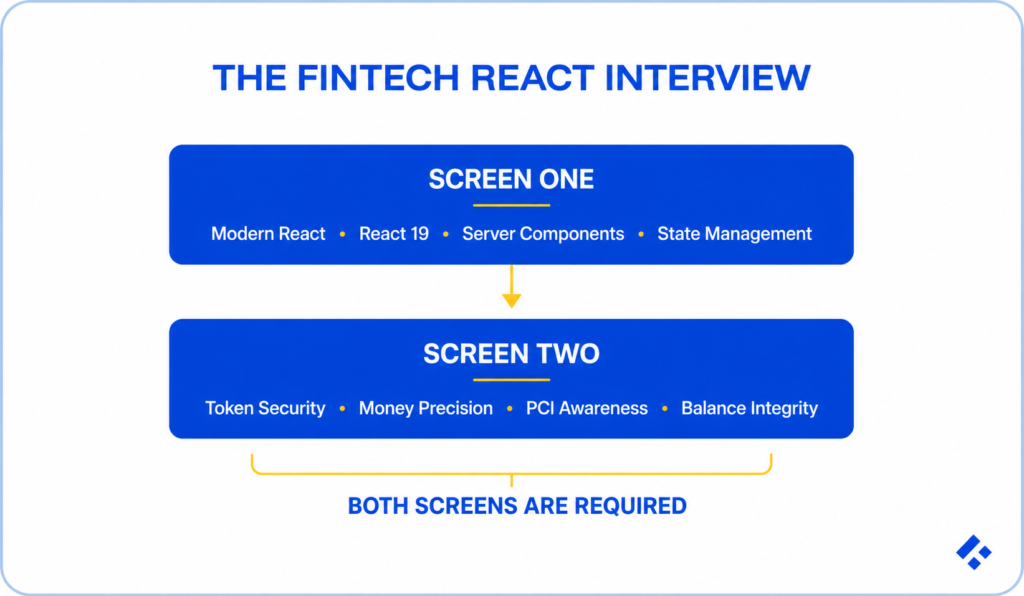
For the sake of this guide, we will assume that you have already conducted the first interview. If not, check out our blog on 20+ React interview questions.
We will focus on fintech-specific questions.
If you're also hiring server-side for the same product, the backend equivalent of this screen (idempotency, reconciliation, and rail-specific correctness) is its own separate interview entirely, and it's worth resisting the urge to combine them.
React 19 is the baseline in 2026.
It shipped in December 2024, and the React Compiler moved from experimental to a genuinely stable release in late 2025.
You need to make sure you’re not hiring someone who is still reasoning about React the way they did in the 18 era.
Here are some questions to help you do that.
While a lot of people might simply say "yes, the compiler handles it now,” that isn’t the whole story.
The real answer is mostly yes for compiled code, with real nuance.
The compiler auto-memoizes at build time, so most manual memoization becomes unnecessary, but a careful candidate notes that they still need to pay attention to values crossing non-compiled boundaries, third-party integrations, and referential-stability contracts your own code exposes to other code.
A dated answer treats everything as a client component or can't articulate the boundary clearly.
The current answer is that they should use server components for data-fetching and static rendering, client components for interactivity and state, pushing the client boundary as far down the tree as practical rather than marking whole pages 'use client' out of habit.
In fintech specifically, a strong candidate usually mentions that keeping data-fetching server-side also keeps tokens and secrets off the client entirely, a security point as much as a performance one.
A dated answer reaches for Redux for everything, or useEffect plus useState for data fetching, treating every piece of state as equivalent.
The current answer separates concerns. Developers handle server state through something purpose-built like TanStack Query, URL state for anything shareable or bookmarkable, and a small client store only for genuine client-only state.
Fintech dashboards tend to be especially server-state-heavy. Transaction lists, balances, statements, and other information live on a server somewhere.
This is the section that actually does the work. There are five questions we like to ask.
A weak answer reaches for localStorage because it's simple and persists, with no threat model attached.
Our developers have commented that a strong answer recognizes that localStorage is readable by any script running on the page, so any XSS vulnerability anywhere on the site becomes token theft.
They'll prefer HTTPOnly, Secure, SameSite cookies that JavaScript can't read at all, or an in-memory access token paired with a proper refresh flow, and they'll probably volunteer the tradeoffs.
Generalists treat it as an ordinary JavaScript number, formatted with something like toFixed(2), with no mention of precision at all, and no sense that anything could go wrong with that approach.
Fintech-experienced developers never use a float for money. Instead, they will talk about integer minor units (cents rather than dollars) or a decimal library, formatted for display only at the very edge with something like Intl.NumberFormat so locale and currency formatting stay correct without hand-rolled string logic.
They'll usually mention, unprompted, that 0.1 plus 0.2 doesn't equal 0.3 in JavaScript, which makes client-side arithmetic on money a real trap rather, and that the client should generally display server-computed amounts rather than calculate them itself.
A weak answer builds a controlled input, validates the card number, and sends it to your API, without flinching.
That's a completely reasonable thing to do with almost any other form field, which is exactly why it's such a common mistake here.
A fintech candidate will reach for a hosted field or an iframe from the payment provider so the raw card number never touches your application's JavaScript or component state, because the moment a card number lands in your React tree, your frontend is inside PCI scope.
You don’t want someone who polls an endpoint on an interval and hopes it stays current.
Instead, look for someone who distinguishes visibly stale from silently wrong, which is a genuinely different problem than how often you poll.
They'll talk about real-time updates where warranted (WebSocket or server-sent events), cache invalidation tied to known events rather than a timer, optimistic updates that reconcile against server truth and roll back cleanly on failure, and, importantly, showing the user when data might be stale rather than presenting an old number with full confidence.
A weak answer pops a generic toast reading something like "something went wrong," treating the decline as an error state like any other.
Strong answers treat the decline reason as meaningful content that has to be accurate, readable, and accessible, since the wrong or vague reason is a support and trust problem at minimum, and in some flows, credit decisions especially, the readability of that specific reason carries real regulatory weight around adverse-action disclosure.
Experienced developers will usually mention screen-reader announcement of the error specifically and won't bury the actionable part of the message under vague reassurance.
Yes, all of these indicate potential knowledge gaps, but none of these are automatically disqualifying on their own. A genuinely strong engineer without fintech exposure can learn all of it.
Instead, these red flags are indicative of a potential increase in ramp cost.
Not every React role at a fintech needs the full money screen. We recommend that you match the depth to the actual surface area the role actually touches.
Building the marketing site or an internal admin tool that never renders customer money? Screen One is genuinely enough.
The mistake runs in both directions: over-screening a low-stakes role until it can't get filled because you're applying fintech-grade paranoia to a marketing page, or under-screening the checkout flow because "it's just frontend."
If you aren’t sure how to proceed, or you do not have the time to go through the hiring process on your own, consider Trio’s developers.